<p style="text-align: justify;"><span style="text-decoration: underline;"><strong>Description</strong>:</span> Users may choose MiniTool Power Data Recovery to carry out RAID data recovery.</p>
<h3 style="text-align: justify;"><span style="color: #800000;"><strong>About RAID Data Recovery</strong></span></h3>
<p style="text-align: justify;"><img class="aligncenter wp-image-4320" src="https://medusamagazine.com/wp-content/uploads/2015/07/RAID-data-recovery-1.png" alt="How To Perform RAID Data Recovery" width="600" height="274" /></p>
<p style="text-align: justify;">With the popularity of RAID, more and more computer users choose to use RAID to improve data transfer rate. Of course, just like a separate hard disk, disk array also has the situation of data loss. And users have no way to avoid data loss on RAID. Because users can’t avoid data loss, they had better get ready for <strong>RAID data recovery</strong>. Next, we will tell users the meaning of RAID as well as reasons for RAID data loss before teaching them how to recover deleted data.</p>
<h3 style="text-align: justify;"><span style="color: #800000;"><strong>What Does RAID Mean</strong></span></h3>
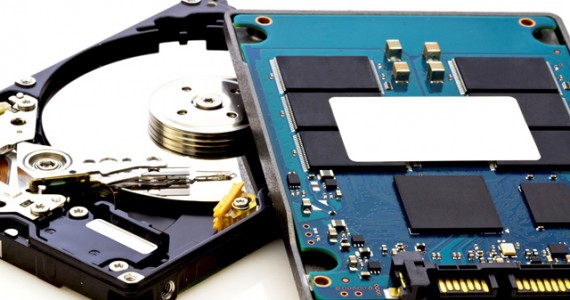
<p style="text-align: justify;">RAID, short for Redundant Arrays of Independent Disks, is made of several cheap hard disks. RAID can store the same data to different places of multiple hard disks. This makes input operation overlap with output operation in a balanced manner. And finally, hard disk performance is enhanced.</p>
<p style="text-align: justify;">RAID is divided into three types, namely external disk array cabinet, internal disk array card and software simulation. External disk array cabinet is most commonly used on large servers. It owns the feature of Hot Swap, but its price is very high. Internal disk array card is suitable for computer technical personnel to use, because it requires high installation technology. Compared with the price of external disk array cabinet, the price of internal disk array card is cheaper. Software simulation is not suitable for servers which need large data traffic, because it will affect servers’ running speed.</p>
<p style="text-align: justify;">The advantages of RAID include that it can improve data transfer rate by saving and reading data on multiple hard disks at the same time (<em>this can greatly improve data throughput of storage system</em>) and provide fault tolerance through data validation.</p>
<p style="text-align: justify;">There are three disadvantages of RAID. Firstly, RAID 0 doesn’t have redundancy function. If a hard disk is damaged, all data on this disk array will be lost. Secondly, disk utilization rate of RAID 1 is the lowest among that of all RAID levels. RAID 0 + 1 is a compromise of RAID 0 and RAID 1. It can provide high data security for system, but protection level is lower than that of Mirror.</p>
<h3 style="text-align: justify;"><span style="color: #800000;"><strong>Reasons for Data Loss</strong></span></h3>
<p style="text-align: justify;">There are five common reasons for hard disk data loss comprising virus attack, wrong formatting, wrong cloning, sudden power failure and accidental deleting. And we believe that users’ data may be lost due to one or several factors mentioned above. If data lost (<em>work or study material</em>) from RAID are very important to users, they need to perform RAID data recovery as soon as possible. Here, we will tell users how to recover deleted data with the help of Power Data Recovery.</p>
<p style="text-align: justify;">Power Data Recovery is a professional and practical file recovery software. It has several functions, such as “<em>Undelete Recovery</em>”, “<em>Damaged Partition Recovery</em>” and “<em>Lost Partition Recovery</em>”. Among these powerful functions, “<em>Undelete Recovery</em>” can help users recover files and folders deleted not only from the recycle bin but also by “<em>Shift + Delete</em>”. This function supports both FAT and NTFS file systems.</p>
<h3 style="text-align: justify;"><span style="color: #800000;"><strong>Recover Deleted Data of RAID with the Help of Power Data Recovery</strong></span></h3>
<p style="text-align: justify;"><img class="aligncenter wp-image-4321" src="https://medusamagazine.com/wp-content/uploads/2015/07/RAID-data-recovery-2.png" alt="How To Perform RAID Data Recovery" width="522" height="403" /></p>
<p style="text-align: justify;">
<ol style="text-align: justify;">
<li>Choose “<em>Undelete Recovery</em>” module in the main interface of Power Data Recovery in order to achieve RAID data recovery.</li>
</ol>
<p style="text-align: justify;"><img class="aligncenter wp-image-4317" src="https://medusamagazine.com/wp-content/uploads/2015/07/RAID-data-recovery-3.png" alt="How To Perform RAID Data Recovery" width="526" height="406" /></p>
<ol style="text-align: justify;" start="2">
<li>Select the certain hard disk partition and click “<em>Scan</em>”.</li>
</ol>
<p style="text-align: justify;"><img class="aligncenter wp-image-4318" src="https://medusamagazine.com/wp-content/uploads/2015/07/RAID-data-recovery-4.png" alt="How To Perform RAID Data Recovery" width="530" height="406" /></p>
<ol style="text-align: justify;" start="3">
<li>Choose the found files users want to recover and click “<em>Save</em>”.</li>
</ol>
<p style="text-align: justify;"><img class="aligncenter wp-image-4319" src="https://medusamagazine.com/wp-content/uploads/2015/07/RAID-data-recovery-5.png" alt="How To Perform RAID Data Recovery" width="535" height="414" /></p>
<ol style="text-align: justify;" start="4">
<li>Choose another partition to save the found files in order to avoid data overwritten and click “<em>OK</em>” to carry out the pending changes.</li>
</ol>
<p style="text-align: justify;">Now, users may know quite clearly about how to perform RAID data recovery with this powerful software. And users can use Power Data Recovery to recover deleted data whenever they want.</p>
<p style="text-align: justify;">Note: This data recovery tool support Windows OS only, if you want to work on MAC OS, please select, MiniTool mac data recovery software.</p>

How To Perform RAID Data Recovery